Sharing files on a Direct Connect hub
Sharing is how you contribute to the network. Your client does not offer loose files on the fly. It builds a file list of everything you share, with folder structure, names, sizes, and hashes (usually TTH). Other people download that list, browse it, and grab what they want, straight from your machine.
Only share what you mean to
Do not add folders that hold private data like personal photos, documents, or any system folders. Everything in your share is visible to others on the hub and can be downloaded. The safest approach is to create a separate folder just for sharing and copy in only the files you want to offer.
Setting up your share in DC++
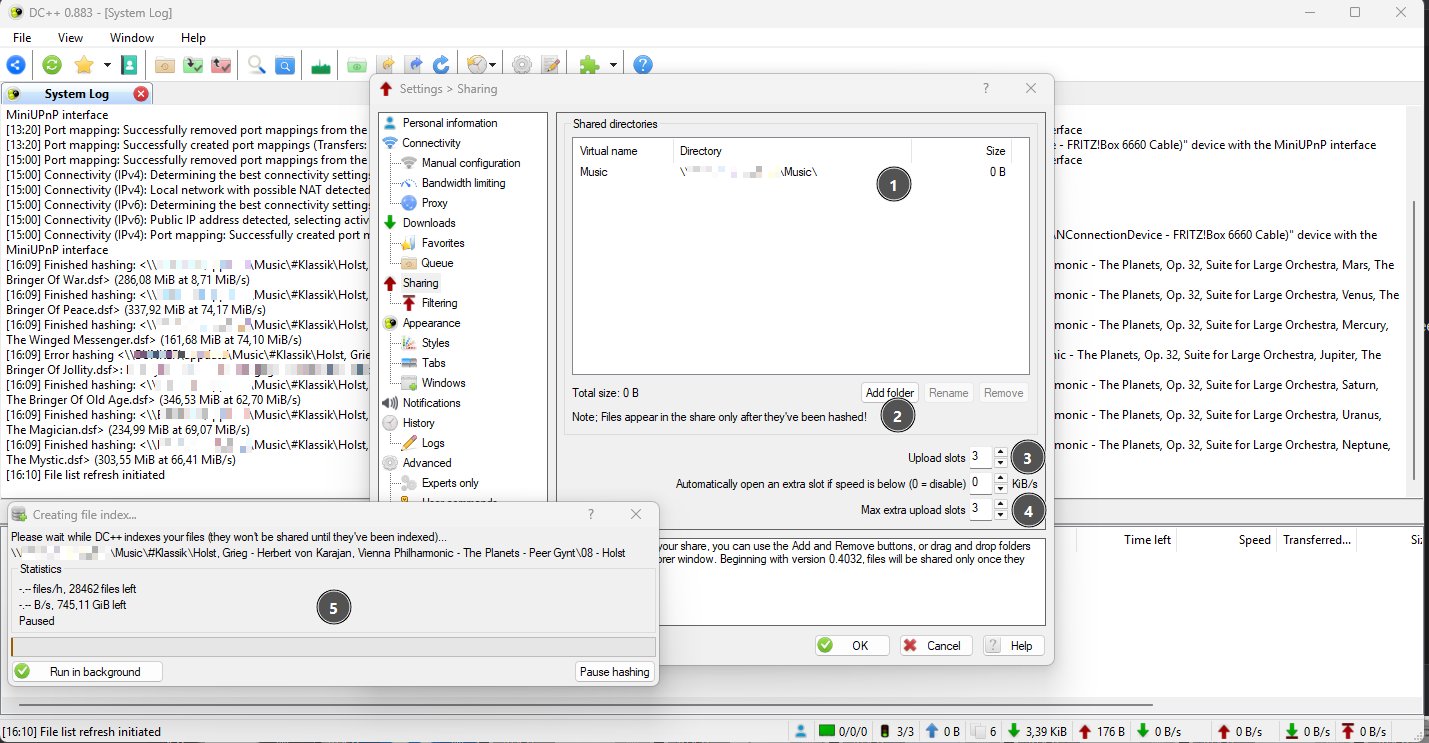
- This window shows your shared folders.
- Click here to add a folder to your share and pick the path.
- Set upload slots based on your connection. On a home connection, 3 to 5 is fine. On a seedbox or server you can go higher, 10 to 30. You will need to experiment a little.
- The extra slots can stay as they are. They are used for small files and file lists when your normal slots are full.
- When you add a folder, hashing starts automatically. This window shows the indexing and hashing progress.
Hashes identify files by content. See TTH & hashing for the details.